Porchlight Slideshow › Bar & bat mitzvahs
Bar & bat mitzvah montages
Thirteen years in photos, for the bar or bat mitzvah
The montage is a highlight of the party, and the candle lighting honors the family and friends who matter most. Porchlight makes both, timed to the music, without video editing.
Free to download and try · $39 once to share your slideshow · Mac & Windows
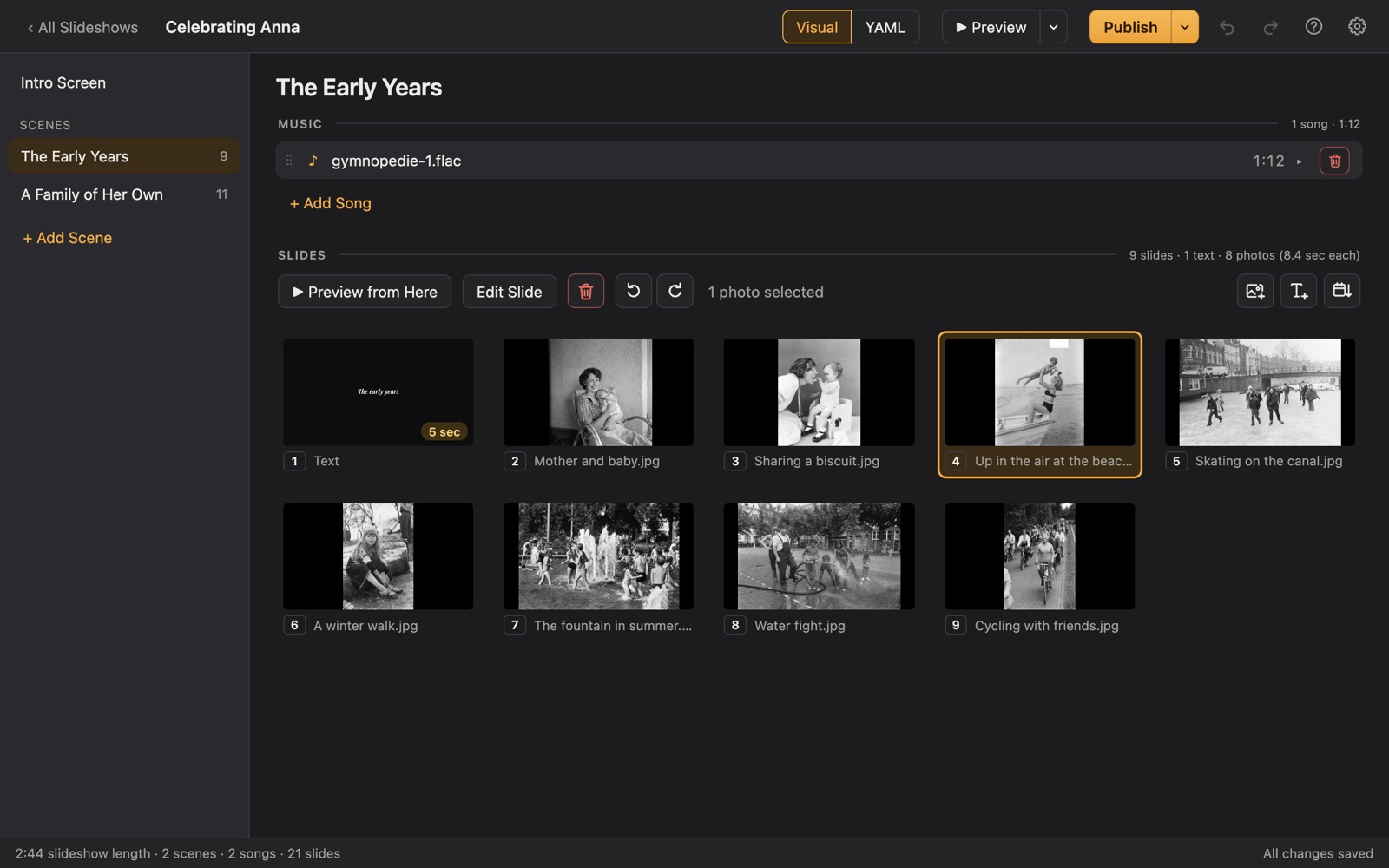
Making a bar or bat mitzvah montage
At many bar and bat mitzvah receptions, the lights dim for a montage of the child growing up, and later there's a candle-lighting ceremony that honors grandparents, family and friends, often with a photo and a song for each candle.
Porchlight fits both. Make the montage with a scene for each stage of childhood. For the candle lighting, make a scene per candle with its own song and a text slide naming the honorees. The Player waits between parts until you press Space, so the emcee or DJ stays in control.
A plan
A plan for the montage and the candles
Each scene gets its own music in Porchlight, so the songs change with the story.
The montage: early years
Baby naming, first birthday, preschool.
The montage: growing up
School, camp, sports, trips, friends and siblings.
The montage: becoming bar/bat mitzvah
Studying, the synagogue, and a closing mazel tov.
Candle lighting
A scene for each candle: a text slide with the honorees' names, their photos together, and the song they come up to.
Tips
Tips
- Talk to the DJ or venue early about how they'll play it; give them the USB stick or a video a few days before.
- Keep each candle scene to one short song, trimmed to the part you want; Porchlight fades it out gently.
- Balance both sides of the family in the montage and the candles.
- The same plan works for a b'nai mitzvah or a confirmation.
How long should it be?
Montage: 5 to 8 minutes, about 50 to 90 photos. Candle lighting: a minute or so per candle.
Choosing music for the montage and candle-lighting
- A song for each candle: one for the grandparents, one for the cousins, one for friends.
- Traditional Jewish music for the family and heritage scenes.
- The celebrant's own favorites for the friends and school years.
Porchlight plays MP3, WAV and FLAC files you have; it doesn't provide music. You're responsible for having the right to use the music and photos in your slideshow, whether you're building, publishing, uploading, playing or sharing it.
How it works
Your bar or bat mitzvah montage in three steps
Drag in the photos
From a folder or the Photos app. Sort them by the date they were taken with one click, or arrange them by hand.
Add the music
Give each scene its songs. Porchlight fits the photos to the music, so the last photo fades out as the last note ends.
Play it anywhere
Put it on a USB stick with the free Player, or save it as an HD or 4K video.
At the reception
Publish to a USB stick with the free Porchlight Player for the DJ's or venue's Mac or PC. It opens full screen and waits at each title until you press Space. Or export an HD or 4K video for the venue's system.
Questions
Good to know
Can the slideshow pause between candles?
Porchlight Player waits on the opening title until you press Space. For a pause between candles, make each candle its own short slideshow, or ask the DJ to pause the video between them.
Can I include Hebrew text?
Titles use the fonts built into Porchlight, which cover English and other Latin-alphabet languages. Hebrew lettering is best added to a photo before you drag it in.
Is Porchlight Slideshow free?
You can download it free and build and preview your whole slideshow. A one-time $39 license lets you publish it to a USB stick and export it as a video, with no subscription. Porchlight Player, for watching, is always free.
Are my photos uploaded anywhere?
No. Porchlight works entirely on your own computer, with no account and no internet needed.
Start your bar or bat mitzvah montage tonight
Download Porchlight Slideshow free, build your slideshow and preview it full screen. Pay once, only when it's ready to share.
More occasions